Activation
The final step in installing the FordEtis IDS is to go online and activate your copy.
To do this you will need to be registered with FordEtis. If you haven't done so already, visit FordEtis Online and register.
If you're ready to activate this DVD, click the activate button and you will be taken to FordEtis Online to complete this set up. If you have not already logged in to the Dealer Portal, you will be asked to do so.
Please enter your PTU serial number. This can be found as indicated in the diagram.
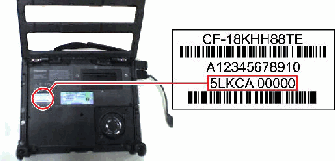
Enter Portable Testing Unit (PTU) serial number.
No internet connection on this machine? Try manual activation.